
Legal and contract intelligence
AI Legal Document Review: Understand Contracts, NDAs, and Agreements Before You Sign
Upload a contract, NDA, lease, or other legal agreement and ask questions about it in plain English. LearnByAi finds the relevant clauses, explains what they mean, and points to the section each answer came from, so you can read with confidence and bring better questions to your lawyer.
- No account required to start
- Delete anytime
- Scanned contracts supported
Last updated

What is AI legal document review?
AI legal document review means using artificial intelligence to read a legal document and answer questions about it. Instead of scrolling through dozens of pages to find the termination clause, you ask “How can this contract be ended?” and get an answer in plain language, together with the part of the document it comes from.
LearnByAi does this with retrieval. Your document is split into sections and indexed, and each question is matched against the most relevant passages before an answer is written. That keeps answers tied to your actual text rather than to general knowledge about contracts.
Which legal documents can you review with AI?
You can upload most of the agreements people are asked to read and sign, including:
- NDAs and confidentiality agreements
- Employment contracts and offer letters
- Commercial and residential lease agreements
- Service and vendor agreements
- Software and SaaS agreements
- Partnership and shareholder agreements
- Terms of service and privacy policies
- Purchase and sale agreements
- Settlement agreements
- Franchise agreements
- Construction contracts
- Consulting and freelance contracts
Supported files: PDF, DOCX, XLSX, and TXT files, plus JPG, PNG, and TIFF images. Scanned PDFs and photos of documents are processed automatically with OCR so you can search and ask questions about their text.
How to review a contract with AI in four steps
You do not need to prepare the file or learn any legal terminology first.
- Upload the document. Add a PDF, Word file, or a scan. Scanned and photographed pages are read with OCR automatically.
- Ask a question. Type it the way you would ask a colleague, for example “What happens if I cancel early?”
- Read the answer and its source. The answer points to the section of your document it came from, so you can check the original wording.
- Follow up or compare. Ask follow-up questions, or upload a second version and ask what changed.
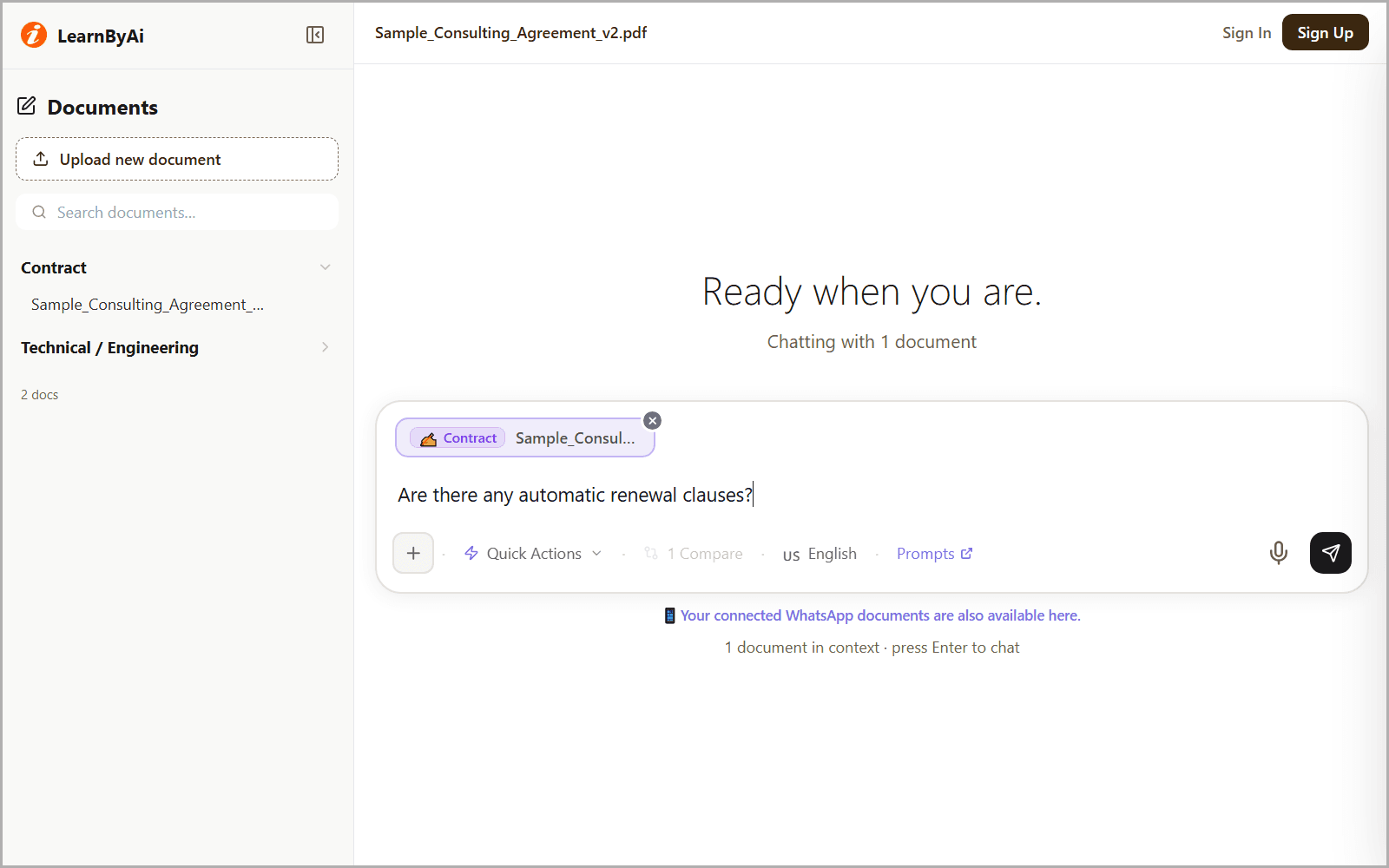
What you can do with LearnByAi contract analysis
Every answer is based on the text of the document you uploaded.
Find specific clauses
- Locate termination, indemnification, liability, confidentiality, and payment clauses without reading every page.
- Get the clause explained in plain English, with a pointer to where it appears.
- Ask about a term by name, or describe what you are looking for in your own words.
Try asking: “What are the termination conditions in this contract?”
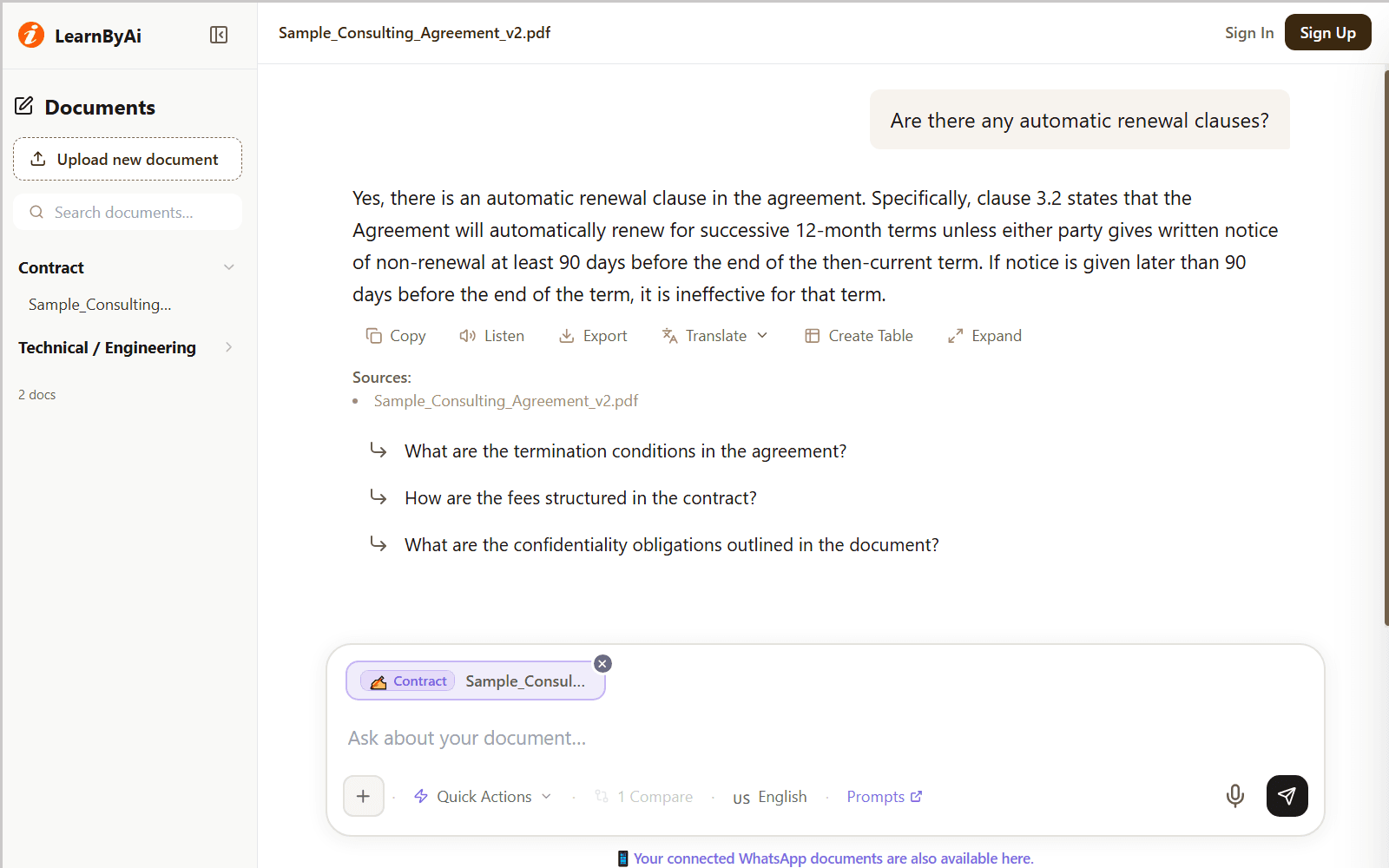
Spot unusual or one-sided terms
- Surface terms that deserve a closer look, such as automatic renewal, broad IP assignment, one-sided arbitration, or uncapped liability.
- Ask whether a standard protection appears to be missing, not just what is present.
- Use the findings as a checklist for your own review or for a conversation with your lawyer.
Try asking: “Are there any unusual or risky clauses I should know about?”
Track obligations and deadlines
- Summarize what each party must do and by when.
- Separate your obligations from the other party's in multi-party agreements.
- Pull out notice periods, renewal windows, and payment dates so you can keep track of them.
Try asking: “What are my obligations under this agreement, and by when?”
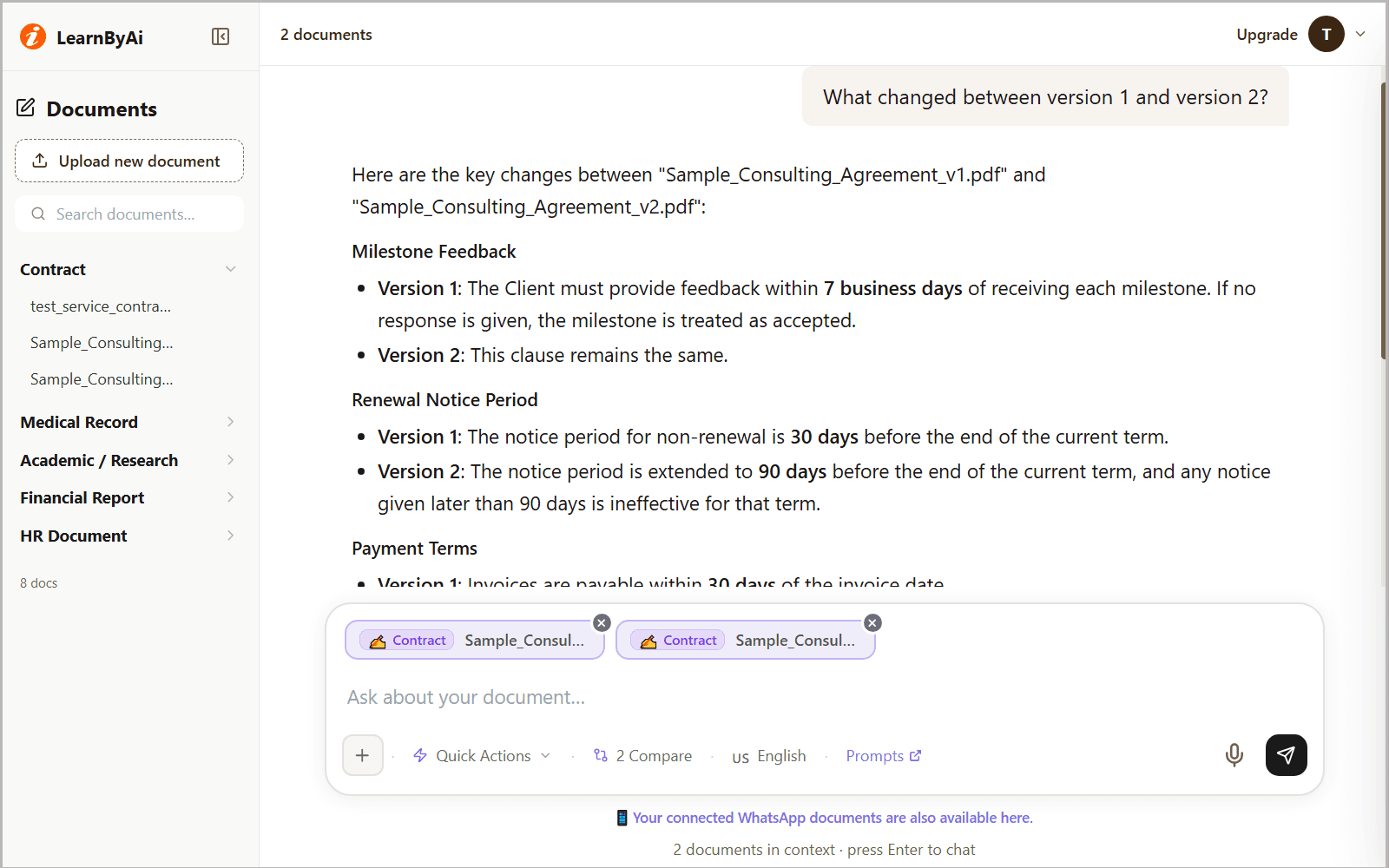
Compare two versions of a contract
- Upload two versions and ask what changed between them.
- See added clauses, removed provisions, and revised terms.
- Review negotiation drafts without comparing documents line by line.
Try asking: “What changed between version 1 and this revised contract?”
Get plain-English explanations
- Turn legal wording into plain English without dropping the substance.
- Understand defined terms, cross-references, and how clauses depend on each other.
- Prepare sharper questions before you meet your attorney.
Try asking: “Explain what this indemnification clause actually means.”
Example: asking about a non-compete and IP assignment
This is an illustrative example based on a sample employment agreement. The clause numbers and terms are for demonstration only.
Question: Are there any non-compete or IP assignment clauses I should be aware of?
Yes. The contract contains both. Here is what each one says.
Non-compete (Clause 8.2)
- Restricts you from working for a competitor for 24 months after termination.
- The geographic scope is worldwide, with no limit to a specific region.
- “Competitor” is defined broadly to include any entity offering similar services.
IP assignment (Clause 11.1)
- All work product created during employment is assigned to the company, including work done outside business hours.
- Covers inventions, software, and creative works.
- There is no carve-out for personal projects unrelated to the company's business.
Note: The non-compete scope is unusually broad. Consider discussing a narrower geographic scope or a shorter duration before signing.
Source: Clauses 8.2 and 11.1, pages 14 to 16 of the uploaded document.
Questions to ask when you review a contract with AI
These are starting points. You can ask anything about your document.
- What are the termination conditions in this contract?
- Find any non-compete or non-solicitation clauses.
- What intellectual property does this agreement assign to the company?
- Summarize my obligations under this NDA.
- Does this NDA have an expiry date, and what survives after it ends?
- Are there any automatic renewal clauses?
- What are the penalties for early termination?
- Explain the indemnification clause in plain English.
- Who is responsible for repairs and maintenance under this lease?
- What changed between version 1 and version 2?
Looking for more? Browse our AI prompts for contract review: 12 ready-to-use questions for summaries, obligations, termination, IP, liability, non-compete, and renewal terms, which you can send to the chat in one click.
Who can use AI to review legal documents?
Anyone who has to read an agreement before signing it, including:
- Startup founders. Read vendor contracts, SaaS agreements, and term sheets before signing, and arrive at a call with your lawyer with specific questions.
- Freelancers and contractors. Check what intellectual property you are assigning, which non-competes apply, and what payment protections exist before accepting a client contract.
- HR and people teams. Look up notice periods, probation terms, and restrictive covenants across employment agreements and offer letters.
- Small business owners. Read supplier agreements, partnership contracts, and commercial leases without waiting days for a first read.
- Legal and paralegal teams. Speed up a first pass by letting the AI locate relevant clauses, so more of your time goes to judgment.
- Individuals. Understand what a lease, settlement, or consumer contract says before you are bound by it.
What AI contract review can and cannot do
AI is a fast way to read and understand a document. It is not a substitute for professional advice.
- LearnByAi is a document analysis tool, not a law firm, and it does not provide legal advice.
- AI can misread or miss details. Check important answers against the cited section of the original document.
- Scanned documents depend on scan quality. Blurry or skewed pages may be read incorrectly.
- Laws and enforceability vary by jurisdiction. A lawyer can tell you what applies to you.
- For high-stakes, binding, or disputed agreements, have a qualified legal professional review the contract before you sign.
Privacy and confidentiality for legal documents
Contracts often contain sensitive information. This is how LearnByAi handles uploaded documents:
- Each document is accessible only from your own session or account, and other users cannot open it.
- Your documents are sent to our AI provider only to generate answers. How that data is handled is described in our Privacy Policy.
- Anonymous-session documents are cleaned up automatically once the session goes idle.
- You can delete a document manually at any time.
For the full details, read our Privacy Policy and Security page.
Free to start, pay as you go
Free allowance: 10 logical pages and 10 messages per day with no account, or 30 logical pages and 15 messages per day with a free account.
If you need more, add funds to a pay-as-you-go wallet. There is no subscription.
Frequently asked questions
Can AI replace a lawyer for contract review?
No. LearnByAi is a document analysis tool, not a law firm, and it does not give legal advice. It helps you understand what a document says, find specific clauses without searching manually, and prepare better questions for your attorney. For high-stakes or legally binding contracts, consult a qualified legal professional.
What file formats can I use to review a contract with AI?
PDF, DOCX, XLSX, and TXT files, plus JPG, PNG, and TIFF images. Scanned PDFs and photos of documents are processed automatically with OCR so you can search and ask questions about their text.
Is my legal document kept confidential?
Each document is accessible only from your own session or account, and other users cannot open it. Your documents are sent to our AI provider only to generate answers. How that data is handled is described in our Privacy Policy. Anonymous-session documents are cleaned up automatically once the session goes idle. You can also delete a document yourself at any time.
How does LearnByAi handle very long contracts?
Long contracts are split into sections and indexed. When you ask a question, the system retrieves the passages most relevant to it before writing the answer. For very long agreements, check the cited section and ask follow-up questions to confirm details. Longer documents also use more pages from your allowance.
Can I compare two versions of the same contract?
Yes. Upload both versions together, then ask “What changed between version 1 and version 2?” or “Which version is more favorable to me?” The AI lists added, removed, and revised terms so you can review a negotiation draft against the previous one.
Can AI review an NDA or an employment contract?
Yes. NDAs, employment agreements, leases, service and vendor agreements, and similar contracts all work. For an NDA, ask about the definition of confidential information, the term, exclusions, and what happens when the agreement ends. For an employment contract, ask about notice periods, non-compete and non-solicitation terms, and intellectual property assignment.
Does it work with contracts in other languages?
You can ask questions in your preferred language and the answer is written in the language of your question. Accuracy can vary by language and by scan quality, so check important passages against the original text.
How accurate is AI contract review?
It is very good at finding and explaining text that is in your document, but it can still misread or miss details. Every answer points to the section it came from so you can verify it. Treat the output as a first read, not a final opinion.
Can I try AI legal document review for free?
No account required to use LearnByAi. Free allowance: 10 logical pages and 10 messages per day without signing in, or 30 logical pages and 15 messages per day with a free account. Add funds to your wallet to pay as you go.
Review your contract with AI
Upload a contract or agreement and ask your first question. No account is needed to start.
Review a legal documentAI analysis for other document types
- General Document: Chat with any PDF, Office file, or scanned document
- Medical / Health: Analyze medical reports and health records
- Academic / Study: Study assistant for research papers and coursework
- Construction / Project: Construction and project document analysis
- HR / Employment: HR and employment document analysis
- Finance / Accounting: Financial statement and report analysis