
Academic and study documents
AI Study Assistant: Chat With Your Textbooks, Lecture Notes, and Research Papers
Upload a textbook chapter, lecture notes, or a research paper and ask questions about it in plain English. LearnByAi explains concepts, summarizes sections, and helps you build practice questions, all from the text of your own material. It is a study aid, not a replacement for doing the work yourself.
- No account required to start
- Delete anytime
- Scanned notes supported
Last updated

What is an AI study assistant?
An AI study assistant lets you ask questions about the material you are actually studying. Instead of searching a 400-page textbook for one definition, you ask “What does the author mean by price elasticity here?” and get an answer written in plain language from the relevant passages.
LearnByAi does this with retrieval. Your document is split into sections and indexed, and each question is matched against the most relevant passages before an answer is written. That keeps answers tied to your own course material instead of to a generic definition from the internet. It explains what your document says, and it can still make mistakes, so use it alongside the original text.
Which study documents can you use with an AI study assistant?
You can upload most of the material students and researchers work with, including:
- Textbooks and eBooks
- Lecture notes and slides
- Research papers and journal articles
- Study guides and revision notes
- Thesis and dissertation drafts
- Course transcripts and handouts
- Past papers and exercise sheets
- Set texts and reading lists
- Language-learning materials
- Scanned notes and handouts
- Reports and case studies
- Data tables in spreadsheets
Supported files: PDF, DOCX, XLSX, and TXT files, plus JPG, PNG, and TIFF images. Scanned PDFs and photos of documents are processed automatically with OCR so you can search and ask questions about their text.
How to study with AI in four steps
You do not need to prepare the file or learn any special commands first.
- Upload your material. Add a PDF, Word file, or a scan or photo of your notes. Scanned pages are read with OCR automatically.
- Ask about a concept or a passage. Type it the way you would ask a tutor, for example “What does this term mean in this chapter?”
- Read the answer and check the source. Answers are based on passages from your document. Check the wording against the original before you rely on it.
- Turn it into study material. Ask for a summary, key points, or practice questions, then test yourself against the text.
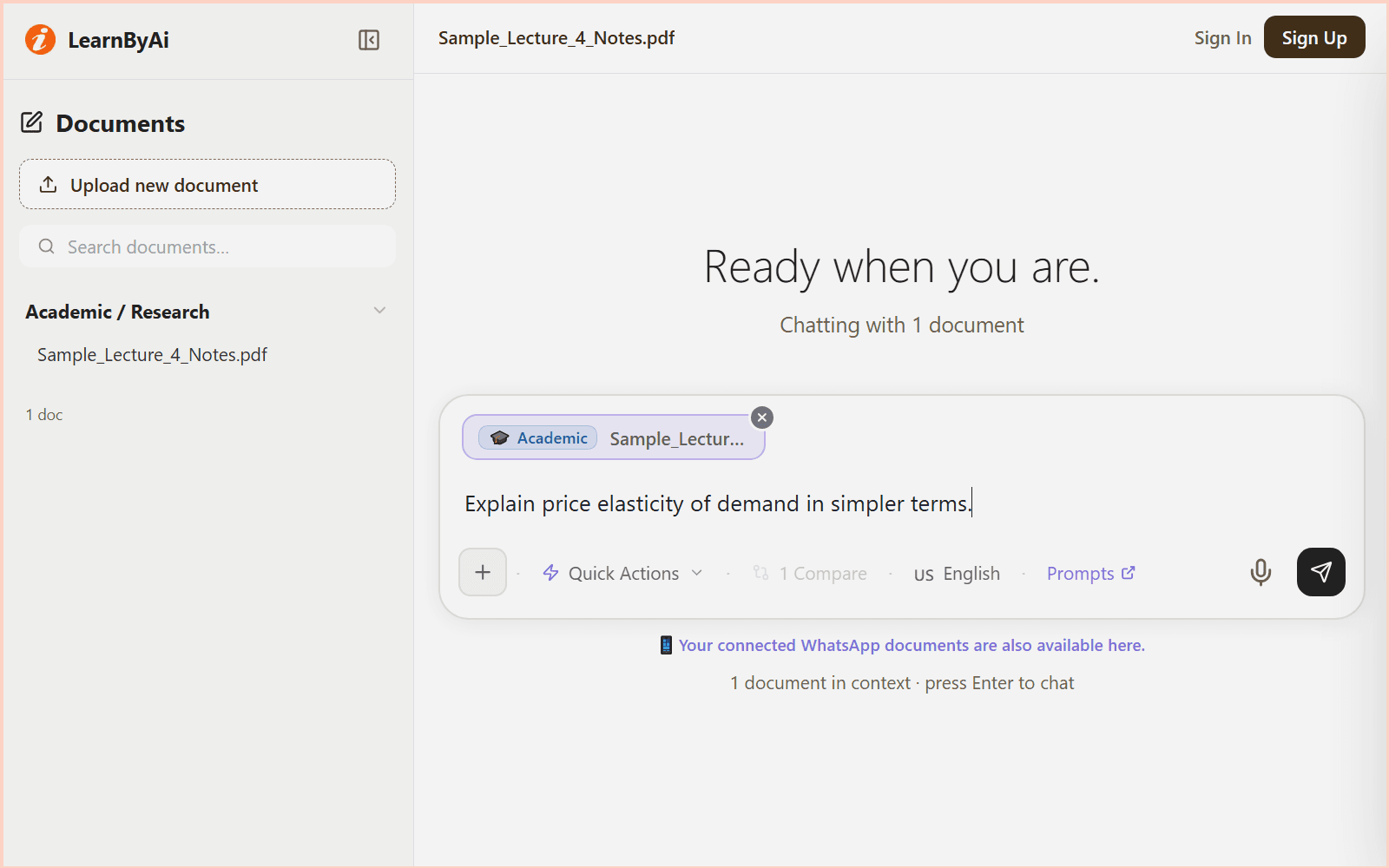
What you can do with LearnByAi as a study assistant
Every answer is based on the document you uploaded.
Understand a concept in context
- Ask what a term means or what the author intends by it in this particular chapter.
- Get an explanation based on the relevant passages of your material, not a generic definition.
- Ask for a simpler explanation or an example when the first answer is too dense.
Try asking: “Explain this concept in simpler terms.”
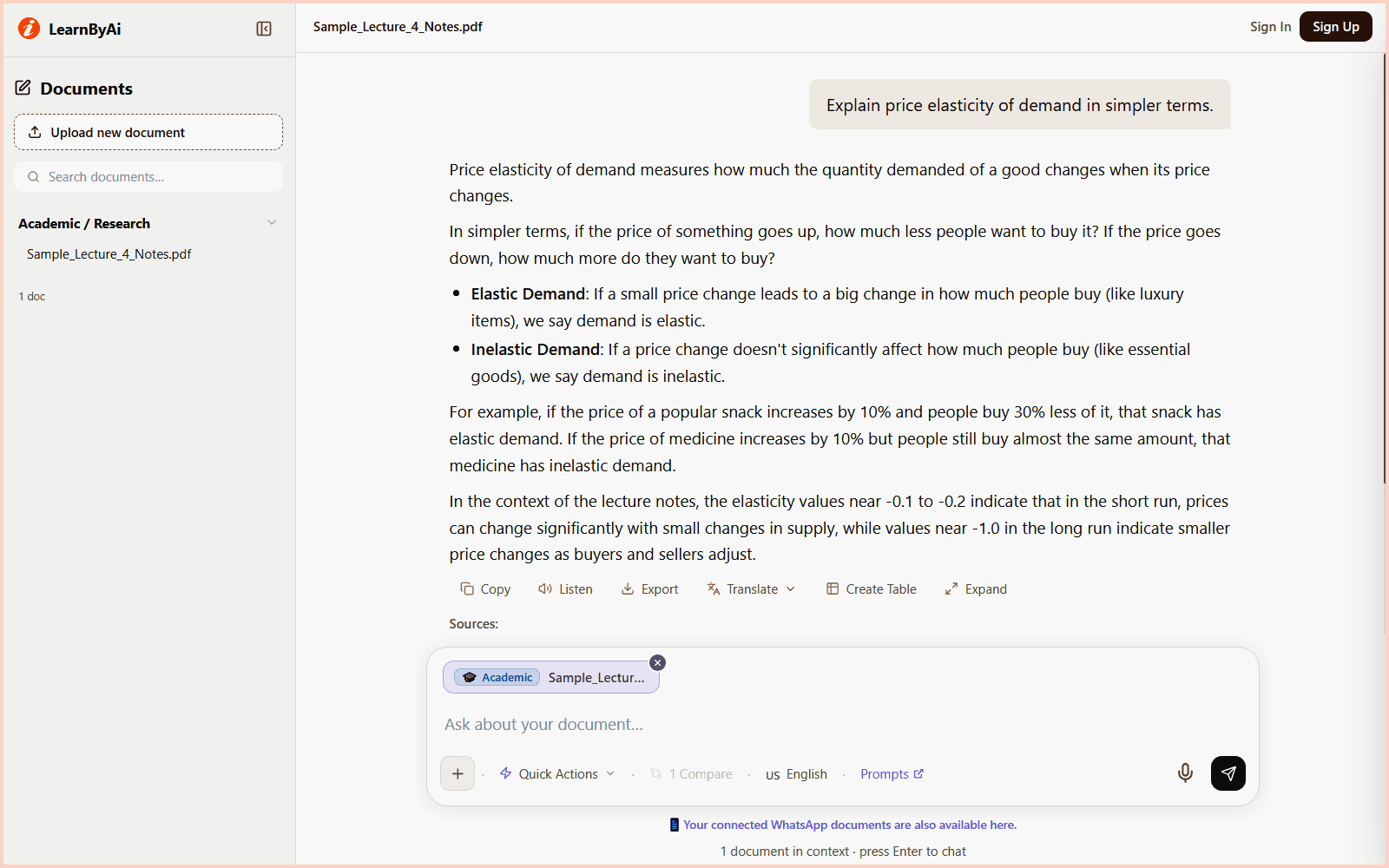
Summarize a chapter or paper for revision
- Request a short summary of a chapter, section, or whole paper.
- Use it to review before an exam or to build an outline for an essay.
- Ask for the key points, key terms, or a structured set of study notes.
Try asking: “Summarize chapter 3 for my exam review.”
Find the references and evidence
- Ask which studies the author cites in support of a specific argument.
- Locate where a statistic or claim comes from within the document.
- Check a claim in the original source before you cite it yourself.
Try asking: “Which studies does the author cite to support this argument?”
Compare several papers
- Upload more than one paper and ask where they agree and disagree.
- Compare methods, samples, and findings across studies.
- Get a head start on a literature review, then read the papers yourself.
Try asking: “What do these three papers agree and disagree on?”
Make practice questions from your notes
- Ask for quiz questions based on a chapter or a set of notes.
- Try to answer them first, then ask for an answer key to check yourself.
- Repeat for the topics you find hardest.
Try asking: “Generate five quiz questions from this chapter.”
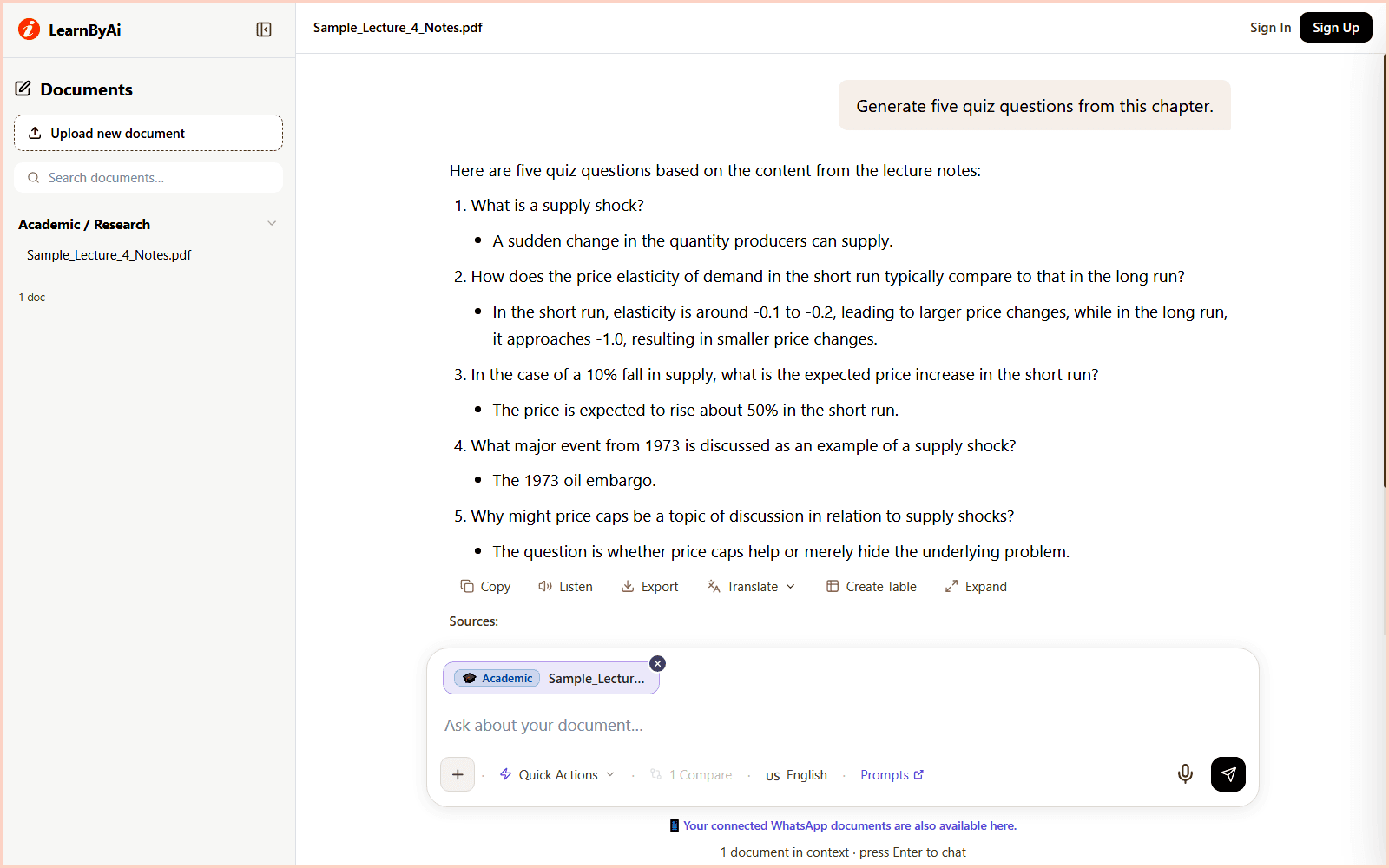
Example: a chapter summary and practice questions
This is an illustrative example based on a fictional economics chapter. The chapter, page numbers, and details are invented for demonstration.
Question: Can you summarize the main argument of this chapter and give me three quiz questions?
Here is a summary and a few questions based on the chapter you uploaded.
Chapter summary
- The chapter argues that supply shocks affect short-run prices more than long-run equilibrium.
- Three historical case studies support this, including the 1973 oil crisis.
Quiz questions
- What distinguishes a short-run supply shock from a long-run one, according to this chapter?
- Which historical event does the author use as the primary case study?
- What does the chapter conclude about price elasticity during a shock?
Note: Try answering the questions before you ask for the answer key. Then check your answers against the chapter itself.
Source: Chapter 5, pages 112 to 128 of the uploaded sample chapter.
Questions to ask when you study with AI
These are starting points. You can ask anything about your document.
- Explain this concept in simpler terms.
- Summarize chapter 3 for my exam review.
- What was the main point of lecture 4?
- What methodology does this research paper use?
- What limitations do the authors state?
- Which studies does the author cite to support this argument?
- What do these three papers agree and disagree on?
- List the key terms defined in this chapter and explain each one.
- Generate five quiz questions from this chapter.
- Test my understanding of this passage.
Looking for more? Browse our AI prompts for research papers and study documents: 11 ready-to-use questions for research questions, methods, findings, limitations, references, and study notes, which you can send to the chat in one click.
Who can use an AI study assistant?
Anyone who has to learn from long documents, including:
- University students. Skip the index and the table of contents. Ask your textbook a question directly and get an answer based on the actual text.
- Graduate researchers and thesis writers. Understand the methods, findings, and stated limitations of papers faster during a literature review.
- High school students. Ask questions about set texts, revision guides, and past papers.
- Self-learners and online course takers. Turn course PDFs, eBooks, and transcripts into interactive study sessions.
- Language learners. Upload a text in a language you are learning and ask comprehension questions to test your understanding.
- Study groups and tutors. Generate summaries and practice questions from shared course material to structure a session.
What an AI study assistant can and cannot do
AI is a fast way to get into your material. It does not replace learning it.
- LearnByAi explains and summarizes the documents you upload. It is not designed to write assignments, and you should not submit its output as your own work.
- Follow your school or university policy on AI tools. If you are unsure what is permitted, ask your instructor.
- AI can misread or miss details. Check important answers against the original text before you rely on or cite them.
- It works from text documents. It cannot watch lecture videos or listen to recordings, so upload a transcript instead.
- Scanned pages depend on scan quality, and handwritten notes are often read incorrectly.
- It is not a substitute for a teacher, a tutor, or reading the source yourself.
Privacy for your study documents
Course material and drafts can be personal. This is how LearnByAi handles uploaded documents:
- Each document is accessible only from your own session or account, and other users cannot open it.
- Your documents are sent to our AI provider only to generate answers. How that data is handled is described in our Privacy Policy.
- Anonymous-session documents are cleaned up automatically once the session goes idle.
- You can delete a document manually at any time.
For the full details, read our Privacy Policy and Security page.
Free to start, pay as you go
Free allowance: 10 logical pages and 10 messages per day with no account, or 30 logical pages and 15 messages per day with a free account.
If you need more, add funds to a pay-as-you-go wallet. There is no subscription.
Frequently asked questions
Will LearnByAi write my assignments for me?
LearnByAi is built to explain and summarize the documents you upload. It is not designed to write essays or produce work you submit as your own, and you should not use it that way. It is there to help you understand your materials faster.
How long can a textbook or paper be?
Long documents are split into sections and indexed, so you can ask about specific chapters or passages. File size and page limits apply and can vary by plan.
Can I upload multiple papers and compare them?
Yes. Select multiple documents in multi-select mode and ask cross-document questions, such as which paper provides the strongest evidence for a claim, or how the methods compare across studies. Check the answers against the papers themselves.
Can AI summarize a research paper?
Yes. Upload the paper and ask for a plain-English summary, the research question, the methods, the main findings, and the limitations the authors state. AI can misread details, so read the relevant sections of the paper before you rely on or cite anything.
Can AI make quiz questions from my notes or a chapter?
Yes. Ask for practice questions from a chapter or set of notes, and ask for an answer key afterwards. Try answering first, then check your answers against the chapter itself.
Is LearnByAi useful for high school students as well as university students?
Yes. Anyone who can upload a document can use it. High school students can ask questions about set texts, revision guides, and past papers in the same way as graduate researchers.
Does using LearnByAi count as academic dishonesty?
LearnByAi is a study aid that explains and summarizes material you already have. It is meant to be used the way you would use a tutor or study group, to understand material faster, not to generate work you submit as your own. Check your institution's policy on AI tools if you are unsure what is permitted.
Can I upload lecture recordings or videos?
Not directly. LearnByAi works with text-based documents. PDF, DOCX, XLSX, and TXT files, plus JPG, PNG, and TIFF images. Scanned PDFs and photos of documents are processed automatically with OCR so you can search and ask questions about their text. If you have a written transcript of a lecture, upload that instead.
Can I study material in another language, or get answers in another language?
Yes. You can choose the response language in the chat, up to 50 languages. This helps when you are learning a language and want to check your understanding of a text. Accuracy can vary by language and by scan quality, so check important details against the original.
Is my study material kept private?
Each document is accessible only from your own session or account, and other users cannot open it. Your documents are sent to our AI provider only to generate answers. How that data is handled is described in our Privacy Policy. Anonymous-session documents are cleaned up automatically once the session goes idle. You can also delete a document yourself at any time.
Can I try the AI study assistant for free?
No account required to use LearnByAi. Free allowance: 10 logical pages and 10 messages per day without signing in, or 30 logical pages and 15 messages per day with a free account. Add funds to your wallet to pay as you go.
Start studying with your own material
Upload a chapter, your notes, or a paper and ask your first question. No account is needed to start.
Start studying with AIAI analysis for other document types
- General Document: Chat with any PDF, Office file, or scanned document
- Legal / Contract: AI-powered contract and legal document review
- Medical / Health: Analyze medical reports and health records
- Construction / Project: Construction and project document analysis
- HR / Employment: HR and employment document analysis
- Finance / Accounting: Financial statement and report analysis